





.png)


.jpeg)


.jpeg)


.jpeg)


.webp)


Mailchimp email 32
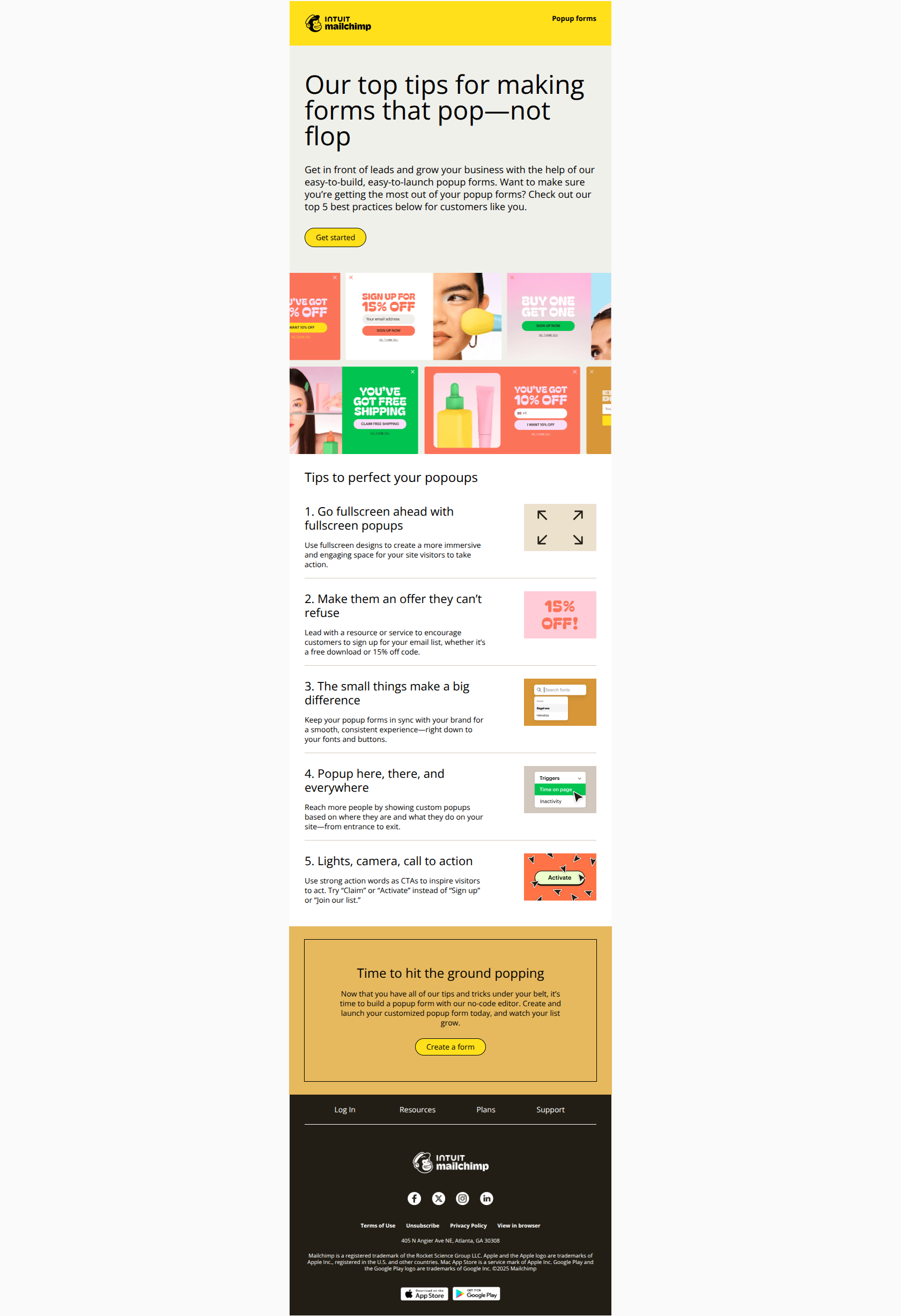
This marketing email from Mailchimp is designed to educate business users on best practices for creating effective popup forms to capture leads and grow their email lists. The email uses a visually rich layout with colorful graphics to highlight five practical tips such as using fullscreen popups, offering compelling incentives, consistent branding, targeted popup triggers, and strong call-to-action language.
The tone is friendly and encouraging, guiding recipients to take action by creating their own popup forms with simple no-code tools, supported by call-to-action buttons linking to Mailchimp's platform and resources.
<!DOCTYPE html> <html xmlns="http://www.w3.org/1999/xhtml" xmlns:v="urn:schemas-microsoft-com:vml" xmlns:o="urn:schemas-microsoft-com:office:office" lang="en" xml_lang="en"> <head> <meta charset="utf-8"> <meta http-equiv="X-UA-Compatible" content="IE=edge"> <meta name="format-detection" content="telephone=no, date=no, address=no, email=no, url=no"> <meta name="viewport" content="width=device-width, initial-scale=1, user-scalable=yes"> <meta name="x-apple-disable-message-reformatting"> <title>🌟 Reach popup perfection with our 5 best practices</title> <!-- || Start: 2024 Modular Template Styles - DO NOT REMOVE --> <style> /* || Typography */ @media only screen and (max-width: 480px) { p { font-size: 12px !important; line-height: 14px !important; } h1 { font-size: 32px !important; line-height: 32px !important; } h1.alt { font-size: 24px !important; } h2 { font-size: 22px !important; line-height: 26px !important; } h3 { font-size: 16px !important; line-height: 18px !important; } .large { font-size: 15px !important; line-height: 20px !important; } .eyebrow1 { font-size: 9px !important; line-height: 11px !important; } .eyebrow2 { font-size: 11px !important; line-height: 14px !important; } .font-9 { font-size: 9px !important; line-height: 11px !important; } } @media only screen and (max-width: 375px) { h3 { font-size: 16px !important; line-height: 18px !important; } } </style> <style> /* || Display */ .desktop-hide { display: none !important; mso-hide: all !important; } @media only screen and (max-width: 480px) { .block { display: block !important; } .cell { display: table-cell !important; } .desktop-hide { display: block !important; mso-hide: none !important; } .inline-block { display: inline-block !important; } .mobile-hide { display: none !important; } table.desktop-hide { display: table !important; } } </style> <style> /* || Padding */ @media only screen and (max-width: 480px) { .p-s { padding: 16px !important; } .p-x-0 { padding-right: 0 !important; padding-left: 0 !important; } .p-x-32 { padding-right: 32px !important; padding-left: 32px !important; } .p-x-60 { padding-right: 60px !important; padding-left: 60px !important; } .p-x-m { padding-right: 20px !important; padding-left: 20px !important; } .p-x-xl { padding-right: 40px !important; padding-left: 40px !important; } .p-y-0 { padding-top: 0 !important; padding-bottom: 0 !important; } .p-y-28 { padding-top: 28px !important; padding-bottom: 28px !important; } .p-y-xs { padding-top: 12px !important; padding-bottom: 12px !important; } .p-y-m { padding-top: 20px !important; padding-bottom: 20px !important; } .p-y-xl { padding-top: 40px !important; padding-bottom: 40px !important; } .p-t-0 { padding-top: 0 !important; } .p-t-28 { padding-top: 32px !important; } .p-t-m { padding-top: 20px !important; } .p-t-l { padding-top: 24px !important; } .p-t-xl { padding-top: 40px !important; } .p-r-0 { padding-right: 0 !important; } .p-r-4 { padding-right: 4px !important; } .p-r-16 { padding-right: 16px !important; } .p-r-xxs { padding-right: 8px !important; } .p-r-xs { padding-right: 12px !important; } .p-r-m { padding-right: 20px !important; } .p-b-0 { padding-bottom: 0 !important; } .p-b-4 { padding-bottom: 4px !important; } .p-b-28 { padding-bottom: 28px !important; } .p-b-32 { padding-bottom: 32px !important; } .p-b-xxs { padding-bottom: 8px !important; } .p-b-xs { padding-bottom: 12px !important; } .p-b-s { padding-bottom: 16px !important; } .p-b-m { padding-bottom: 20px !important; } .p-b-l { padding-bottom: 24px !important; } .p-b-xl { padding-bottom: 40px !important; } .p-l-m { padding-left: 20px !important; } .valign-m { vertical-align: middle !important; } } </style> <style> /* || Vertical spacing */ [class*='vspace'] { font-size: 0; } @media only screen and (max-width: 480px) { .vspace-xxs { height: 8px !important; line-height: 8px !important; } .vspace-xs { height: 12px !important; line-height: 12px !important; } .vspace-s { height: 16px !important; line-height: 16px !important; } .vspace-m { height: 20px !important; line-height: 20px !important; } .vspace-l { height: 24px !important; line-height: 24px !important; } .vspace-xl { height: 40px !important; line-height: 40px !important; } } </style> <style> /* || Sizing */ .fw-d { width: 100% !important; } @media only screen and (max-width: 480px) { .fw { width: 100% !important; } .fw-d { width: initial !important; } .height-100 { height: 100% !important; } .hw { width: 50% !important; } .large-photo { width: 180px !important; } .retinaImage { max-width: 100% !important; } .square { width: 50vw !important; height: 50vw !important; max-height: 50vw !important; } .width-20px { width: 20px !important; } } </style> <style> /* || Header */ @media only screen and (max-width: 480px) { .header-logo { width: 102px !important; } .logo-cell.with-qb, .header-logo.with-qb { width: 204px !important; } .logo-nav-menu [class*='-cell'] { padding: 0 !important; } .logo-nav-menu .logo-cell, .logo-nav-menu .nav-cell { padding: 0 !important; } } </style> <style> /* || CTA */ @media only screen and (max-width: 480px) { .primary-cta { padding: 8px 20px !important; } .primary-cta, .primary-cta a, .primary-cta a span { font-size: 12px !important; line-height: 12px !important; } .secondary-cta { padding: 8px 16px !important; } .secondary-cta, .secondary-cta a, .secondary-cta a span { font-size: 12px !important; line-height: 12px !important; } .secondary-style-3 { padding: 8px 0 !important; } .secondary-style-3 a { vertical-align: initial !important; } .secondary-style-3 a img { vertical-align: text-top !important; } .tertiary-cta, .tertiary-cta a, .tertiary-cta a span { font-size: 9px !important; line-height: 9px !important; } .cta-chevron { height: 12px !important; } .cta-arrow { height: 14px !important; } } </style> <style> /* || Footer */ @media only screen and (max-width: 480px) { .footer-nav-table th { display: block !important; padding: 12px 20px !important; border-bottom: 1px solid #000; } .footer-nav-menu-full-bleed-dark .footer-nav-table th, .footer-nav-menu-partial-bleed-dark .footer-nav-table th { border-color: #fff !important; } .footer-nav-table th.last-item { border-bottom: none; } .footer-nav-table th a, .footer-nav-table th a span { font-size: 12px !important; } .footer-logo { width: 122px !important; } .footer .logo-cell, .footer .socials-cell { display: table-cell !important; } .footer .logo-cell { width: 122px !important; padding: 0 !important; text-align: left !important; } .footer .socials-cell { padding: 0 !important; text-align: right !important; vertical-align: middle; } .footer .socials-cell table { float: right !important; } .footer .socials-cell table::after { clear: both !important; } .footer .text-links { width: 100% !important; } .footer .text-links td { padding: 0 35px 0 0 !important; text-align: left !important; } .footer .text-links td + td + td + td { padding: 0 !important; } } @media only screen and (max-width: 333px) { .footer .logo-cell { padding-bottom: 20px !important; } } </style> <style> /* || Utility */ .center { width: 65% !important; margin: 0 auto !important; text-align: center !important; } .highlight { padding: 0 6px; background-color: #ffe01b; } @media only screen and (max-width: 480px) { .center { width: 90% !important; } .mobile-no-borders { border: none !important; } .icon-22 { width: 22px !important; } .icon-26 { width: 26px !important; } .icon-36 { width: 36px !important; } .icon-40 { width: 40px !important; } .icon-s { height: 16px !important; } .icon-m { height: 20px !important; } .icon-l { width: 28px !important; } .icon-xl { width: 56px !important; } .icon-xxl { width: 64px !important; } .text-center { text-align: center !important; } .text-left { text-align: left !important; } } </style> <style> /* || Module-specific */ @media only screen and (max-width: 350px) { .three-col .column { max-width: 100% !important; } .three-col .column > div { padding-right: 0 !important; padding-left: 0 !important; } } @media only screen and (min-width: 351px) and (max-width: 460px) { .three-col .column { max-width: 49% !important; } .three-col .column.col-1 > div, .three-col .column.col-3 > div, .three-col .column.col-5 > div { padding-right: 12px !important; padding-left: 0 !important; text-align: right !important; } .three-col .column.col-2 > div, .three-col .column.col-4 > div, .three-col .column.col-6 > div { padding-right: 0 !important; padding-left: 12px !important; text-align: left !important; } .three-col .column.col-5 > div, .three-col .column.col-6 > div { padding-bottom: 0 !important; } .three-col.five .column.col-5 > div { padding-right: 0 !important; text-align: center !important; } } @media only screen and (max-width: 480px) { .hero-two-column-graphic-left-aligned .left { padding-right: 0 !important; } .hero-two-column-graphic-left-aligned .right { padding-left: 0 !important; } .two-col-image-list .list-image { width: 125px !important; } .two-col-left-image-classic-cta .list-image, .two-col-left-image-arrow-cta .list-image { width: 180px !important; } .int-icon { width: 38px !important; } } @media only screen and (min-width: 461px) { .three-col .column { max-width: 33.3% !important; } .three-col.four .column, .three-col.five .column.col-4, .three-col.five .column.col-5 { max-width: 50% !important; } } </style> <style> /* || Gmail-specific template styles (webmail/iOS/Android) */ div > u + .body .column > div, u + .body .column > div { padding-right: 0 !important; padding-left: 0 !important; } u + .body .three-col.four .column.col-1 .col-content, u + .body .three-col.four .column.col-3 .col-content { padding-right: 24px !important; } u + .body .three-col.four .column.col-2 .col-content, u + .body .three-col.four .column.col-4 .col-content, u + .body .three-col.five .column.col-5 .col-content { padding-left: 24px !important; } @media only screen and (max-width: 480px) { div > u + .body .square, u + .body .square { width: 50% !important; height: 50vw !important; } div > u + .body .large-photo, u + .body .large-photo { width: 180px !important; } div > u + .body .m-x-auto, u + .body .m-x-auto { margin-right: auto !important; margin-left: auto !important; } div > u + .body .two-col-left-image-classic-cta .list-image, u + .body .two-col-left-image-classic-cta .list-image, div > u + .body .two-col-left-image-arrow-cta .list-image, u + .body .two-col-left-image-arrow-cta .list-image { width: 45vw !important; } div > u + .body .three-col .column.col-1 .col-content, div > u + .body .three-col .column.col-3 .col-content, div > u + .body .three-col .column.col-5 .col-content, u + .body .three-col .column.col-1 .col-content, u + .body .three-col .column.col-3 .col-content, u + .body .three-col .column.col-5 .col-content { padding-right: 12px !important; padding-left: 0 !important; text-align: right !important; } div > u + .body .three-col .column.col-2 .col-content, div > u + .body .three-col .column.col-4 .col-content, div > u + .body .three-col .column.col-6 .col-content, u + .body .three-col .column.col-2 .col-content, u + .body .three-col .column.col-4 .col-content, u + .body .three-col .column.col-6 .col-content { padding-right: 0 !important; padding-left: 12px !important; text-align: left !important; } div > u + .body .three-col .column.col-5 .col-content, div > u + .body .three-col .column.col-6 .col-content, u + .body .three-col .column.col-5 .col-content, u + .body .three-col .column.col-6 .col-content { padding-bottom: 0 !important; } div > u + .body .three-col.four .column.col-2 .col-content, div > u + .body .three-col.four .column.col-4 .col-content, u + body .three-col.four .column.col-2 .col-content, u + body .three-col.four .column.col-4 .col-content { padding-right: 0 !important; } div > u + .body .three-col.five .column.col-5 .col-content, u + .body .three-col.five .column.col-5 .col-content { padding-right: 0 !important; padding-left: 0 !important; text-align: center !important; } } @media only screen and (min-width: 351px) and (max-width: 460px) { div > u + .body .three-col .column img, u + .body .three-col .column img, .three-col .column img { width: 150px !important; } div > u + .body .three-col .column, u + .body .three-col .column { max-width: 49% !important; } } </style> <style> /* || Outlook app-specific template styles (iOS/Android) */ @media only screen and (max-width: 480px) { .column\0 { width: 49% !important; } .inline-img-cell\0 { width: 180px !important; } .large-photo\0 { width: 180px !important; } .square\0 { width: 50% !important; height: inherit !important; } .three-col .column.col-1 .col-content\0, .three-col .column.col-3 .col-content\0, .three-col .column.col-5 .col-content\0 { padding-right: 12px !important; padding-left: 0 !important; text-align: right !important; } .three-col .column.col-2 .col-content\0, .three-col .column.col-4 .col-content\0, .three-col .column.col-6 .col-content\0 { padding-right: 0 !important; padding-left: 12px !important; text-align: left !important; } .three-col .column.col-5 .col-content\0, .three-col .column.col-6 .col-content\0 { padding-bottom: 0 !important; } .three-col.four .column.col-4 .col-content\0, .three-col.four .column.col-2 .col-content\0 { padding-right: 0 !important; } .three-col.five .column.col-5 > .col-content\0 { padding-right: 0 !important; padding-left: 0 !important; text-align: center !important; } } </style> <style> /* || General client-specific overrides */ #outlook a { padding: 0; } .ReadMsgBody, .ExternalClass { width: 100%; } a[href^='tel'], a[href^='sms'] { color: inherit; cursor: default; text-decoration: none; } p, a, li, td, body, table, blockquote { -ms-text-size-adjust: 100%; -webkit-text-size-adjust: 100%; } .ExternalClass, .ExternalClass p, .ExternalClass td, .ExternalClass div, .ExternalClass span, .ExternalClass font { line-height: 100%; } /* Link styling overrides */ /* || Apple */ a[x-apple-data-detectors] { color: inherit !important; font-family: inherit !important; font-size: inherit !important; font-weight: inherit !important; line-height: inherit !important; text-decoration: none !important; } /* || Samsung */ #MessageViewBody a { color: inherit !important; font-family: inherit !important; font-size: inherit !important; font-weight: inherit !important; line-height: inherit !important; text-decoration: none !important; } /* || Gmail */ u + .body a { color: inherit !important; font-family: inherit !important; font-size: inherit !important; font-weight: inherit !important; line-height: inherit !important; text-decoration: none !important; } /* Bullet list styling overrides (Gmail-specific) */ u + .body .glist { margin-left: 0 !important; } @media only screen and (max-width: 640px) { u + .body .glist { margin-left: 25px !important; } } </style> <!-- || DO NOT REMOVE --> <!-- [if mso]> <style type="text/css"> div, td { padding: 0; } div { margin: 0 !important; } body { font-family: Helvetica, Arial, sans-serif !important; } table td { font-family: Helvetica, Arial, sans-serif !important; } table td a { font-family: Helvetica, Arial, sans-serif !important; } p { font-family: Helvetica, Arial, sans-serif !important; } .outlook-remove-padding { padding: 0 !important; } </style> <noscript> <xml> <o:OfficeDocumentSettings> <o:PixelsPerInch>96</o:PixelsPerInch> </o:OfficeDocumentSettings> </xml> </noscript> <![endif]--> <!-- || END DO NOT REMOVE --> </head> <body class="body" style="width: 100%; height: 100%; padding: 0; margin: 0; background-color: #fafafa; -ms-text-size-adjust: 100%; -webkit-text-size-adjust: 100%; word-spacing: normal; word-wrap: normal;"><div style="display:none;font-size:1px;color:#333333;line-height:1px;max-height:0px;max-width:0px;opacity:0;overflow:hidden;"> Read our popup form tips for businesses like yours </div> <div role="article" aria-roledescription="email" lang="en" style="background-color: #fafafa; -webkit-text-size-adjust: 100%; -ms-text-size-adjust: 100%;"> <table role="presentation" style="width: 100%; border: none; background-color: #fafafa; border-collapse: collapse; border-spacing: 0; mso-table-lspace: 0; mso-table-rspace: 0;" width="100%"> <tr> <td align="center" style="padding: 0;"> <!-- BEGIN TEMPLATE // --> <!-- || NOTE: Change the background color to match the overall template background color using the "background-color" CSS value in the <table> element below, and in the <div> element that follows --> <!--[if mso]> <table role="presentation" style="width: 100%; border: none; border-collapse: collapse; border-spacing: 0; mso-table-lspace: 0; mso-table-rspace: 0;" width="600"><tr><td style="padding: 0;"><![endif]--> <div class="outer" style="width: 100%; min-width: 100%; max-width: 600px; margin: 0 auto;"> <!-- Start: PREHEADER -------------------------------------------> <table class="fw" role="presentation" width="600" style="border: none; border-collapse: collapse; border-spacing: 0; mso-table-lspace: 0; mso-table-rspace: 0;" align="center"> <tr> <td valign="top"> <span style="display: none; width: 0; height: 0; font-size: 0; visibility: hidden;"> ‌ ‌ ‌ ‌ ‌ ‌ ‌ ‌ ‌ ‌ ‌ ‌ ‌ ‌ ‌ ‌ ‌ ‌ ‌ ‌ ‌ ‌ ‌ ‌ ‌ ‌ ‌ ‌ ‌ ‌ ‌ ‌ ‌ ‌ ‌ ‌ ‌ ‌ ‌ ‌ ‌ ‌ ‌ ‌ ‌ ‌ ‌ ‌ ‌ ‌ ‌ ‌ ‌ ‌ ‌ ‌ ‌ ‌ ‌ ‌ ‌ ‌ ‌ ‌ ‌ ‌ ‌ ‌ ‌ ‌ ‌ ‌ ‌ ‌ ‌ ‌ ‌ ‌ ‌ ‌ ‌ ‌ ‌ ‌ ‌ ‌ ‌ ‌ ‌ ‌ ‌ ‌ ‌ ‌ ‌ ‌ ‌ ‌ ‌ ‌ ‌ ‌ ‌ ‌ ‌ ‌ ‌ ‌ ‌ ‌ ‌ ‌ ‌ ‌ ‌ ‌ ‌ ‌ ‌ ‌ ‌ ‌ ‌ ‌ ‌ ‌ ‌ ‌ ‌ ‌ ‌ ‌ ‌ ‌ ‌ ‌ ‌ ‌ ‌ ‌ ‌ ‌ ‌ ‌ ‌ ‌ ‌ ‌ ‌ ‌ ‌ ‌ ‌ ‌ ‌ ‌ ‌ ‌ ‌ ‌ ‌ ‌ ‌ ‌ ‌ ‌ ‌ ‌ ‌ ‌ ‌ ‌ ‌ ‌ ‌ ‌ ‌ ‌ ‌ ‌ ‌ ‌ ‌ ‌ ‌ ‌ ‌ ‌ ‌ ‌ ‌ ‌ ‌ ‌ ‌ ‌ ‌ ‌ ‌ ‌ ‌ ‌ ‌ ‌ ‌ ‌ ‌ ‌ ‌ ‌ ‌ ‌ ‌ ‌ ‌ ‌ ‌ ‌ ‌ ‌ ‌ ‌ ‌ ‌ ‌ ‌ ‌ ‌ ‌ ‌ ‌ ‌ ‌ ‌ ‌ ‌ ‌ ‌ ‌ ‌ ‌ ‌ ‌ ‌ ‌ ‌ ‌ ‌ ‌ ‌ ‌ ‌ ‌ ‌ ‌ ‌ ‌ ‌ ‌ ‌ ‌ ‌ ‌ ‌ ‌ ‌ ‌ ‌ ‌ ‌ ‌ ‌ ‌ ‌ ‌ ‌ ‌ ‌ ‌ ‌ ‌ ‌ ‌ ‌ ‌ ‌ ‌ ‌ ‌ ‌ ‌ ‌ ‌ ‌ ‌ ‌ ‌ ‌ ‌ </span> </td> </tr> </table> <!-- End: PREHEADER ---------------------------------------------> <!-- Start: HEADER AREA - ↓↓↓ Place header module here ↓↓↓ ------> <!-- Start: logo-nav-earmark -----------------------------------> <!-- NOTE: Update the background color of the module by changing the "background-color" CSS rule in the <table> element's "style" attribute below; you may also need to change the color of the Spacer rows to match --> <table class="header logo-nav-earmark fw" role="presentation" width="600" style="border: none; background-color: #ffe01b; border-collapse: collapse; border-spacing: 0; mso-table-lspace: 0; mso-table-rspace: 0;" align="center"> <!-- Start: Spacer row (td) ----------------------------> <!-- NOTE: Update the background color of this row by removing the "background" CSS rule in the <td> element's "style" attribute below, and then changing the hex value of the "background-color" CSS rule --> <tr> <td class="p-t-m" style="padding: 24px 0 0; background-color: #ffe01b; font-size: 0; line-height: 1; mso-line-height-rule: exactly;" colspan="2"> </td> </tr> <!-- End: Spacer row (td) ------------------------------> <tbody> <tr> <!-- Start: Linked logo (a) ---------------------------> <!-- NOTE: Update the link by replacing the existing URL with the desired URL in the <a> elements "href" attribute below --> <td class="logo-cell p-x-m" style="width: 125px; padding: 0 28px; text-align: left; vertical-align: top;"> <a href="https://app.e.mailchimp.com/e/er?utm_medium=email&utm_source=Eloqua&utm_campaign=978&s=3533916&lid=777&elqTrackId=94411063386945a8a2bcda4978178ce7&elq=508c119da8804be8bfd1a987fa406aa5&elqaid=5548&elqat=1&elqak=8AF52D93D2643ABF6DFA2A274BEA3C4BD2CA4640B731CBD84FAFA42DEC359277638E" title="Visit us at mailchimp.com" rel="noopener" target="_blank"> <img class="header-logo" src="https://images.e.mailchimp.com/EloquaImages/clients/IntuitMailchimp/%7Bc3c1f887-4799-42fc-841c-7f6507195ad9%7D_446f30b5-0a3b-cdc5-8e93-b51ef7943a2a.png" alt="Intuit Mailchimp" style="display: block; width: 125px; max-width: 125px; border: none; margin: 0; -ms-interpolation-mode: bicubic; outline: none;" width="125"> </a> </td> <!-- End: Linked logo (a) ------------------------------> <!-- Start: Eyebrow 2 text (p) -------------------------> <!-- NOTE: Update the text color by changing the "color" CSS rule in the <p> element's "style" attribute below --> <td class="p-x-m" style="padding: 0 28px; font-size: 13px; line-height: 16px; mso-line-height-rule: exactly; text-align: right; vertical-align: top;"> <p class="eyebrow2" style="display: block; padding: 0; margin: 0; color: #000; font-family: 'Helvetica Neue', Helvetica, Arial, Verdana, sans-serif; font-size: 13px; font-weight: 700; line-height: 16px; mso-line-height-rule: exactly;">Popup forms</p> </td> <!-- End: Eyebrow 2 text (p) ---------------------------> </tr> <!-- Start: Spacer row (td) ----------------------------> <!-- NOTE: Update the background color of this row by removing the "background" CSS rule in the <td> element's "style" attribute below, and then changing the hex value of the "background-color" CSS rule --> <tr> <td class="p-t-m" style="padding: 24px 0 0; background-color: #ffe01b; font-size: 0; line-height: 1; mso-line-height-rule: exactly;" colspan="2"> </td> </tr> <!-- End: Spacer row (td) ------------------------------> </tbody> </table> <!-- End: logo-nav-earmark --------------------------------------> <!-- End: HEADER AREA - ↑↑↑ Place header module here ↑↑↑ --------> <!-- Start: CONTENT AREA - ↓↓↓ Place content modules here ↓↓↓ ---> <!-- Start: hero-cta-bottom-image -------------------------------> <!-- NOTE: Update the background color of the module by changing the "background-color" CSS rule in the <table> element's "style" attribute below; you may also need to change the color of the Spacer rows to match --> <table class="module hero hero-cta-bottom-image fw" role="presentation" width="600" style="border: none; background-color: #f0f0eb; border-collapse: collapse; border-spacing: 0; mso-table-lspace: 0; mso-table-rspace: 0;" align="center"> <!-- Start: Spacer row (td) ----------------------------> <!-- NOTE: Update the background color of this row by removing the "background" CSS rule in the <td> element's "style" attribute below, and then changing the hex value of the "background-color" CSS rule --> <tr> <td class="p-t-m" style="padding: 24px 0 0; background-color: #f0f0eb; font-size: 0; line-height: 1; mso-line-height-rule: exactly;"> </td> </tr> <!-- End: Spacer row (td) ------------------------------> <!-- Start: Spacer row (td) ----------------------------> <!-- NOTE: Update the background color of this row by removing the "background" CSS rule in the <td> element's "style" attribute below, and then changing the hex value of the "background-color" CSS rule --> <tr> <td class="p-t-m" style="padding: 24px 0 0; background-color: #f0f0eb; font-size: 0; line-height: 1; mso-line-height-rule: exactly;"> </td> </tr> <!-- End: Spacer row (td) ------------------------------> <!-- Start: Heading (h1) -------------------------------> <!-- NOTE: Update the text color by changing the "color" CSS rule in the <h1> element's "style" attribute below --> <tr> <td class="p-x-m p-b-m" style="padding: 0 28px 28px; font-size: 48px; line-height: 48px; mso-line-height-rule: exactly;"> <h1 style="padding: 0; margin: 0; color: #000; font-family: Helvetica, Arial, sans-serif; font-size: 48px; font-weight: 400; line-height: 48px; mso-line-height-rule: exactly;">Our top tips for making forms that pop—not flop</h1> </td> </tr> <!-- End: Heading (h1) ---------------------------------> <!-- Start: Body text (p.large) ------------------------> <!-- NOTE: Update the text color by changing the "color" CSS rule in the <p> element's "style" attribute below --> <tr> <td class="p-x-m p-b-m" style="padding: 0 28px 28px; font-size: 18px; line-height: 23px; mso-line-height-rule: exactly;"> <p class="large" style="padding: 0; margin: 0; color: #000; font-family: Helvetica, Arial, sans-serif; font-size: 18px; font-weight: 400; line-height: 23px; mso-line-height-rule: exactly;">Get in front of leads and grow your business with the help of our easy-to-build, easy-to-launch popup forms. Want to make sure you’re getting the most out of your popup forms? Check out our top 5 best practices below for customers like you.</p> </td> </tr> <!-- End: Body text (p.large) --------------------------> <!-- Start: Primary CTA (a) ----------------------------> <!-- NOTE: Update the CTA link by replacing the existing URL with the desired URL in the <a> element's "href" attribute below --> <tr> <td class="p-x-m p-b-xl" style="padding: 0 28px 48px;"> <table role="presentation" style="border-collapse: separate; border-spacing: 0; mso-table-lspace: 0; mso-table-rspace: 0;"> <tr> <td class="primary-cta" style="padding: 10px 20px; border: 1px solid #000; border-radius: 42px; background-color: #ffe01b; font-size: 14px; line-height: 14px; mso-line-height-rule: exactly; mso-padding-alt: 10px 20px;" align="center"> <a href="https://app.e.mailchimp.com/e/er?utm_medium=email&utm_source=Eloqua&utm_campaign=978&s=3533916&lid=2490&elqTrackId=92c14e75094440bf9a1e5775f4b67d8c&elq=508c119da8804be8bfd1a987fa406aa5&elqaid=5548&elqat=1&elqak=8AF51CCD6D811600ADED6DE1C31D5CE38ECE4640B731CBD84FAFA42DEC359277638E" rel="noopener" target="_blank" style="display: block; padding: 0; margin: 0; line-height: 14px; mso-line-height-rule: exactly; text-decoration: none;"><span style="color: #000; font-family: Helvetica, Arial, sans-serif; font-size: 14px; font-weight: 400; text-decoration: none;">Get started</span></a> </td> </tr> </table> </td> </tr> <!-- End: Primary CTA ------------ -----------------------> <!-- Start: Linked image (a, img) ------------------------> <!-- NOTE: Update the link for the image by adding the URL to the "href" attribute in the <a> element below --> <!-- NOTE: Update the image by replacing the existing URL with the desired image's URL in the <img> element's "src" attribute below --> <tr> <td style="padding: 0;"> <a href="https://app.e.mailchimp.com/e/er?utm_medium=email&utm_source=Eloqua&utm_campaign=978&s=3533916&lid=2490&elqTrackId=36c6fe3eb54343c99f1a257a48eaf333&elq=508c119da8804be8bfd1a987fa406aa5&elqaid=5548&elqat=1&elqak=8AF5B9230FBA25316775A80502CE073735254640B731CBD84FAFA42DEC359277638E" target="_blank"> <img class="fw" src="https://images.e.mailchimp.com/EloquaImages/clients/IntuitMailchimp/%7B69187677-3ad4-48fe-9ae5-194e2565cc68%7D_Email_3A-_Hero_2x.png" alt="A graphic showcasing multiple colorful popup forms, from a 15% off popup to a free shipping popup." width="600" style="display: block; width: 100%; max-width: 600px; height: auto; -ms-interpolation-mode: bicubic; outline: none;"> </a> </td> </tr> <!-- End: Linked image (a, img) --------------------------> </table> <!-- End: hero-cta-bottom-image ---------------------------------> <!-- Start: hero-photo-sandwich-cta -----------------------------> <!-- NOTE: Update the background color of the module by changing the "background-color" CSS rule in the <table> element's "style" attribute below; you may also need to change the color of the Spacer rows to match --> <table class="module hero hero-photo-sandwich-cta fw" role="presentation" width="600" style="border: none; background-color: #fff; border-collapse: collapse; border-spacing: 0; mso-table-lspace: 0; mso-table-rspace: 0;" align="center"> <!-- Start: Spacer Row (td) ------------------------------> <!-- NOTE: Update the background color of this row by removing the "background" CSS rule in the <td> element's "style" attribute below, and then changing the hex value of the "background-color" CSS rule --> <tr> <td class="p-t-m" style="padding: 24px 0 0; background-color: #fff; font-size: 0; line-height: 1; mso-line-height-rule: exactly;"> </td> </tr> <!-- End: Spacer Row (td) ------------------------------> <!-- Start: Heading (h1.alt) ---------------------------> <!-- NOTE: Update the text color by changing the "color" CSS rule in the <h1> element's "style" attribute below --> <tr> <td class="p-x-m p-b-xl" style="padding: 0 28px 32px; font-size: 24px; line-height: 37px; mso-line-height-rule: exactly;"> <h1 class="alt" style="padding: 0; margin: 0; color: #000; font-family: Helvetica, Arial, sans-serif; font-size: 24px; font-weight: 400; line-height: 37px; mso-line-height-rule: exactly;">Tips to perfect your popoups</h1> </td> </tr> <!-- End: Heading (h1.alt) -------------------------------> </table> <!-- End: hero-photo-sandwich-cta -------------------------------> <!-- Start: body-two-column-in-line-image-right-aligned-arrow-cta --> <!-- NOTE: Update the background color of the module by changing the "background-color" CSS rule in the <table> element's "style" attribute below; you may also need to change the color of the Spacer rows to match --> <table class="module two-col body-two-column-in-line-image-right-aligned-arrow-cta fw" role="presentation" width="600" style="border: none; background-color: #fff; border-collapse: collapse; border-spacing: 0; mso-table-lspace: 0; mso-table-rspace: 0;" align="center"> <!-- Start: First row of content -----------------------> <tr> <td class="p-x-m p-b-m" style="padding: 0 28px 24px; mso-padding-alt: 0 28px 24px;"> <table class="fw" role="presentation" width="544" style="border-bottom: 1px solid #d2c8be; background-color: #fff; border-collapse: collapse; border-spacing: 0; mso-table-lspace: 0; mso-table-rspace: 0;" align="center" dir="rtl"> <tr> <!-- Start: Linked image (a, img) (stacking) --------> <!-- NOTE: Update the link for the image by adding the URL to the "href" attribute in the <a> element below --> <!-- NOTE: Update the image by replacing the existing URL with the desired image's URL in the <img> element's "src" attribute below --> <th class="block fw text-left" width="205" style="padding: 0 0 12px; text-align: right; vertical-align: top;" dir="ltr"> <img class="list-image" src="https://images.e.mailchimp.com/EloquaImages/clients/IntuitMailchimp/%7Bfb2dc04d-23e2-4abf-9882-ad7c6c0a9491%7D_Email_3-_Module_1.png" alt="A rectangular graphic displaying a black arrow pointing outwards in each corner." width="135" style="width: 135px; height: auto; padding: 0; margin: 0; -ms-interpolation-mode: bicubic; outline: none;"> </th> <!-- End: Linked image (a, img) (stacking) ----------> <!-- Start: Text content (stacking) -------> <th class="block fw" width="339" style="padding: 0; text-align: left;" dir="ltr"> <table class="fw" role="presentation" width="339" style="border: none; border-collapse: collapse; border-spacing: 0; mso-table-lspace: 0; mso-table-rspace: 0;"> <!-- Start: Heading (h3) -------> <!-- NOTE: Update the text color by changing the "color" CSS rule in the <h3> element's "style" attribute below --> <tr> <td class="p-b-xs" style="padding: 0 0 16px; font-size: 22px; line-height: 26px; mso-line-height-rule: exactly;"> <h3 style="padding: 0; margin: 0; color: #000; font-family: Helvetica, Arial, sans-serif; font-size: 22px; font-weight: 400; line-height: 26px; mso-line-height-rule: exactly;">1. Go fullscreen ahead with fullscreen popups</h3> </td> </tr> <!-- End: Heading (h3) ---------> <!-- Start: Body text (p) ------> <!-- NOTE: Update the text color by changing the "color" CSS rule in the <p> element's "style" attribute below --> <tr> <td class="p-b-xs" style="padding: 0 0 16px; font-size: 14px; line-height: 18px; mso-line-height-rule: exactly;"> <p style="padding: 0; margin: 0; color: #000; font-family: Helvetica, Arial, sans-serif; font-size: 14px; font-weight: 400; line-height: 18px; mso-line-height-rule: exactly;">Use fullscreen designs to create a more immersive and engaging space for your site visitors to take action.</p> </td> </tr> <!-- End: Body text (p) --------> </table> </th> <!-- End: Text content (stacking) ---------> </tr> </table> </td> </tr> <!-- End: First row of content -------------------------> <!-- Start: Second row of content ----------------------> <tr> <td class="p-x-m p-b-m" style="padding: 0 28px 24px; mso-padding-alt: 0 28px 24px;"> <table class="fw" role="presentation" width="544" style="border-bottom: 1px solid #d2c8be; background-color: #fff; border-collapse: collapse; border-spacing: 0; mso-table-lspace: 0; mso-table-rspace: 0;" align="center" dir="rtl"> <tr> <!-- Start: Linked image (a, img) (stacking) --------> <!-- NOTE: Update the link for the image by adding the URL to the "href" attribute in the <a> element below --> <!-- NOTE: Update the image by replacing the existing URL with the desired image's URL in the <img> element's "src" attribute below --> <th class="block fw text-left" width="205" style="padding: 0 0 12px; text-align: right; vertical-align: top;" dir="ltr"> <img class="list-image" src="https://images.e.mailchimp.com/EloquaImages/clients/IntuitMailchimp/%7Ba01a6f00-a133-40ee-a720-60822c73efb5%7D_Email_3A-_Module_2.png" alt="A pink and orange graphic that says “15% off!”" width="135" style="width: 135px; height: auto; padding: 0; margin: 0; -ms-interpolation-mode: bicubic; outline: none;"> </th> <!-- End: Linked image (a, img) (stacking) ----------> <!-- Start: Text content (stacking) ------> <th class="block fw" width="339" style="padding: 0; text-align: left;" dir="ltr"> <table class="fw" role="presentation" width="339" style="border: none; border-collapse: collapse; border-spacing: 0; mso-table-lspace: 0; mso-table-rspace: 0;"> <!-- Start: Heading (h3) -------> <!-- NOTE: Update the text color by changing the "color" CSS rule in the <h3> element's "style" attribute below --> <tr> <td class="p-b-xs" style="padding: 0 0 16px; font-size: 22px; line-height: 26px; mso-line-height-rule: exactly;"> <h3 style="padding: 0; margin: 0; color: #000; font-family: Helvetica, Arial, sans-serif; font-size: 22px; font-weight: 400; line-height: 26px; mso-line-height-rule: exactly;">2. Make them an offer they can’t refuse</h3> </td> </tr> <!-- End: Heading (h3) ---------> <!-- Start: Body text (p) ------> <!-- NOTE: Update the text color by changing the "color" CSS rule in the <p> element's "style" attribute below --> <tr> <td class="p-b-xs" style="padding: 0 0 16px; font-size: 14px; line-height: 18px; mso-line-height-rule: exactly;"> <p style="padding: 0; margin: 0; color: #000; font-family: Helvetica, Arial, sans-serif; font-size: 14px; font-weight: 400; line-height: 18px; mso-line-height-rule: exactly;">Lead with a resource or service to encourage customers to sign up for your email list, whether it’s a free download or 15% off code.</p> </td> </tr> <!-- End: Body text (p) --------> </table> </th> <!-- End: Text content (stacking) ---------> </tr> </table> </td> </tr> <!-- End: Second row of content ------------------------> <!-- Start: Third row of content -----------------------> <tr> <td class="p-x-m p-b-m" style="padding: 0 28px 24px; mso-padding-alt: 0 28px 24px;"> <table class="fw" role="presentation" width="544" style="border-bottom: 1px solid #d2c8be; background-color: #fff; border-collapse: collapse; border-spacing: 0; mso-table-lspace: 0; mso-table-rspace: 0;" align="center" dir="rtl"> <tr> <!-- Start: Linked image (a, img) (stacking) --------> <!-- NOTE: Update the link for the image by adding the URL to the "href" attribute in the <a> element below --> <!-- NOTE: Update the image by replacing the existing URL with the desired image's URL in the <img> element's "src" attribute below --> <th class="block fw text-left" width="205" style="padding: 0 0 12px; text-align: right; vertical-align: top;" dir="ltr"> <img class="list-image" src="https://images.e.mailchimp.com/EloquaImages/clients/IntuitMailchimp/%7B78920c62-2be5-4a3f-ada7-b5b45d4bad7c%7D_Email_3-_Module_3.png" alt="A graphic showcasing a small dropdown menu of fonts." width="135" style="width: 135px; height: auto; padding: 0; margin: 0; -ms-interpolation-mode: bicubic; outline: none;"> </th> <!-- End: Linked image (a, img) (stacking) ----------> <!-- Start: Text content (stacking) -------> <th class="block fw" width="339" style="padding: 0; text-align: left;" dir="ltr"> <table class="fw" role="presentation" width="339" style="border: none; border-collapse: collapse; border-spacing: 0; mso-table-lspace: 0; mso-table-rspace: 0;"> <!-- Start: Heading (h3) -------> <!-- NOTE: Update the text color by changing the "color" CSS rule in the <h3> element's "style" attribute below --> <tr> <td class="p-b-xs" style="padding: 0 0 16px; font-size: 22px; line-height: 26px; mso-line-height-rule: exactly;"> <h3 style="padding: 0; margin: 0; color: #000; font-family: Helvetica, Arial, sans-serif; font-size: 22px; font-weight: 400; line-height: 26px; mso-line-height-rule: exactly;">3. The small things make a big difference</h3> </td> </tr> <!-- End: Heading (h3) ---------> <!-- Start: Body text (p) ------> <!-- NOTE: Update the text color by changing the "color" CSS rule in the <p> element's "style" attribute below --> <tr> <td class="p-b-xs" style="padding: 0 0 16px; font-size: 14px; line-height: 18px; mso-line-height-rule: exactly;"> <p style="padding: 0; margin: 0; color: #000; font-family: Helvetica, Arial, sans-serif; font-size: 14px; font-weight: 400; line-height: 18px; mso-line-height-rule: exactly;">Keep your popup forms in sync with your brand for a smooth, consistent experience—right down to your fonts and buttons.</p> </td> </tr> <!-- End: Body text (p) --------> </table> </th> <!-- End: Text content (stacking) ---------> </tr> </table> </td> </tr> <!-- End: Third row of content -------------------------> <!-- Start: Fourth row of content -----------------------> <tr> <td class="p-x-m p-b-m" style="padding: 0 28px 24px; mso-padding-alt: 0 28px 24px;"> <table class="fw" role="presentation" width="544" style="border-bottom: 1px solid #d2c8be; background-color: #fff; border-collapse: collapse; border-spacing: 0; mso-table-lspace: 0; mso-table-rspace: 0;" align="center" dir="rtl"> <tr> <!-- Start: Linked image (a, img) (stacking) --------> <!-- NOTE: Update the link for the image by adding the URL to the "href" attribute in the <a> element below --> <!-- NOTE: Update the image by replacing the existing URL with the desired image's URL in the <img> element's "src" attribute below --> <th class="block fw text-left" width="205" style="padding: 0 0 12px; text-align: right; vertical-align: top;" dir="ltr"> <img class="list-image" src="https://images.e.mailchimp.com/EloquaImages/clients/IntuitMailchimp/%7B46d252d6-a648-405b-898e-4fc556cc8d39%7D_Email_3-_Module_4.png" alt="A graphic showcasing a small dropdown menu of popup triggers." width="135" style="width: 135px; height: auto; padding: 0; margin: 0; -ms-interpolation-mode: bicubic; outline: none;"> </th> <!-- End: Linked image (a, img) (stacking) ----------> <!-- Start: Text content (stacking) -------> <th class="block fw" width="339" style="padding: 0; text-align: left;" dir="ltr"> <table class="fw" role="presentation" width="339" style="border: none; border-collapse: collapse; border-spacing: 0; mso-table-lspace: 0; mso-table-rspace: 0;"> <!-- Start: Heading (h3) -------> <!-- NOTE: Update the text color by changing the "color" CSS rule in the <h3> element's "style" attribute below --> <tr> <td class="p-b-xs" style="padding: 0 0 16px; font-size: 22px; line-height: 26px; mso-line-height-rule: exactly;"> <h3 style="padding: 0; margin: 0; color: #000; font-family: Helvetica, Arial, sans-serif; font-size: 22px; font-weight: 400; line-height: 26px; mso-line-height-rule: exactly;">4. Popup here, there, and everywhere</h3> </td> </tr> <!-- End: Heading (h3) ---------> <!-- Start: Body text (p) ------> <!-- NOTE: Update the text color by changing the "color" CSS rule in the <p> element's "style" attribute below --> <tr> <td class="p-b-xs" style="padding: 0 0 16px; font-size: 14px; line-height: 18px; mso-line-height-rule: exactly;"> <p style="padding: 0; margin: 0; color: #000; font-family: Helvetica, Arial, sans-serif; font-size: 14px; font-weight: 400; line-height: 18px; mso-line-height-rule: exactly;">Reach more people by showing custom popups based on where they are and what they do on your site—from entrance to exit.</p> </td> </tr> <!-- End: Body text (p) --------> </table> </th> <!-- End: Text content (stacking) ---------> </tr> </table> </td> </tr> <!-- End: Fourth row of content -------------------------> <!-- Start: Fifth row of content ----------------------> <tr> <td class="p-x-m" style="padding: 0 28px;"> <table class="fw" role="presentation" width="544" style="border: none; background-color: #fff; border-collapse: collapse; border-spacing: 0; mso-table-lspace: 0; mso-table-rspace: 0;" align="center" dir="rtl"> <tr> <!-- Start: Linked image (a, img) (stacking) --------> <!-- NOTE: Update the link for the image by adding the URL to the "href" attribute in the <a> element below --> <!-- NOTE: Update the image by replacing the existing URL with the desired image's URL in the <img> element's "src" attribute below --> <th class="block fw text-left" width="205" style="padding: 0 0 12px; text-align: right; vertical-align: top;" dir="ltr"> <img class="list-image" src="https://images.e.mailchimp.com/EloquaImages/clients/IntuitMailchimp/%7Bbe0495fd-820d-40a5-ae71-eec4fd66c95d%7D_Email_3-_Module_5.png" alt="A graphic with a CTA button in the center that says “Activate,” and numerous black cursors around it." width="135" style="width: 135px; height: auto; padding: 0; margin: 0; -ms-interpolation-mode: bicubic; outline: none;"> </th> <!-- End: Linked image (a, img) (stacking) ----------> <!-- Start: Text content (stacking) -------> <th class="block fw" width="339" style="padding: 0; text-align: left;" dir="ltr"> <table class="fw" role="presentation" width="339" style="border: none; border-collapse: collapse; border-spacing: 0; mso-table-lspace: 0; mso-table-rspace: 0;"> <!-- Start: Heading (h3) -------> <!-- NOTE: Update the text color by changing the "color" CSS rule in the <h3> element's "style" attribute below --> <tr> <td class="p-b-xs" style="padding: 0 0 16px; font-size: 22px; line-height: 26px; mso-line-height-rule: exactly;"> <h3 style="padding: 0; margin: 0; color: #000; font-family: Helvetica, Arial, sans-serif; font-size: 22px; font-weight: 400; line-height: 26px; mso-line-height-rule: exactly;">5. Lights, camera, call to action</h3> </td> </tr> <!-- End: Heading (h3) ---------> <!-- Start: Body text (p) ------> <!-- NOTE: Update the text color by changing the "color" CSS rule in the <p> element's "style" attribute below --> <tr> <td class="p-b-xs" style="padding: 0 0 16px; font-size: 14px; line-height: 18px; mso-line-height-rule: exactly;"> <p style="padding: 0; margin: 0; color: #000; font-family: Helvetica, Arial, sans-serif; font-size: 14px; font-weight: 400; line-height: 18px; mso-line-height-rule: exactly;">Use strong action words as CTAs to inspire visitors to act. Try “Claim” or “Activate” instead of “Sign up” or “Join our list.”</p> </td> </tr> <!-- End: Body text (p) --------> </table> </th> <!-- End: Text column (stacking) ----------> </tr> </table> </td> </tr> <!-- End: Fifth row of content ------------------------> <!-- Start: Spacer Row (td) ------------------------------> <!-- NOTE: Update the background color of this row by removing the "background" CSS rule in the <td> element's "style" attribute below, and then changing the hex value of the "background-color" CSS rule --> <tr> <td class="p-t-m" style="padding: 24px 0 0; background-color: #fff; font-size: 0; line-height: 1; mso-line-height-rule: exactly;"> </td> </tr> <!-- End: Spacer Row (td) ------------------------------> </table> <!-- End: body-two-column-in-line-image-right-aligned-arrow-cta ----> <!-- Start: body-one-column-center-aligned-cta ------------------> <!-- NOTE: Update the background color of the module by changing the "background-color" CSS rule in the <table> element's "style" attribute below; you may also need to change the color of the Spacer rows to match --> <table class="module one-col body-one-column-center-aligned-cta fw" role="presentation" width="600" style="border: none;background-color: #e6b95f; border-collapse: collapse; border-spacing: 0; mso-table-lspace: 0; mso-table-rspace: 0;" align="center"> <!-- Start: Spacer row (td) ----------------------------> <!-- NOTE: Update the background color of this row by removing the "background" CSS rule in the <td> element's "style" attribute below, and then changing the hex value of the "background-color" CSS rule --> <tr> <td class="p-t-m" style="padding: 24px 0 0; background-color: #e6b95f; font-size: 0; line-height: 1; mso-line-height-rule: exactly;"> </td> </tr> <!-- End: Spacer row (td) ------------------------------> <!-- Start: Outline container --------------------------> <tr> <td class="p-x-m" style="padding: 0 28px;"> <table class="module one-col one-col-centered-outline-1 fw" role="presentation" width="544" style="border: none;background-color: #e6b95f; border-collapse: collapse; border-spacing: 0; mso-table-lspace: 0; mso-table-rspace: 0;" align="center"> <tr> <td class="p-x-32 p-y-xl" style="padding: 48px 52px; border: 1px solid #000;"> <table class="fw" role="presentation" width="440" style="border: none;background-color: #e6b95f; border-collapse: collapse; border-spacing: 0; mso-table-lspace: 0; mso-table-rspace: 0;" align="center"> <!-- Start: Heading (h2) ----------> <!-- NOTE: Update the text color by changing the "color" CSS rule in the <h2> element's "style" attribute below --> <tr> <td class="p-b-xs" style="padding: 0 0 16px; font-size: 24px; line-height: 28px; mso-line-height-rule: exactly;"> <h2 style="margin: 0; color: #000; font-family: Helvetica, Arial, sans-serif; font-size: 24px; font-weight: 400; line-height: 28px; mso-line-height-rule: exactly; text-align: center;">Time to hit the ground popping</h2> </td> </tr> <!-- End: Heading (h2) ------------> <!-- Start: Body text (p) ---------> <!-- NOTE: Update the text color by changing the "color" CSS rule in the <p> element's "style" attribute below --> <tr> <td class="p-b-s" style="padding: 0 0 20px; font-size: 14px; line-height: 18px; mso-line-height-rule: exactly; text-align: center;"> <p style="padding: 0; margin: 0;color: #000; font-family: Helvetica, Arial, sans-serif; font-size: 14px; font-weight: 400; line-height: 18px; mso-line-height-rule: exactly;">Now that you have all of our tips and tricks under your belt, it’s time to build a popup form with our no-code editor. Create and launch your customized popup form today, and watch your list grow.</p> </td> </tr> <!-- End: Body text (p) -----------> <!-- Start: Secondary CTA, Style 1 (a) --> <!-- NOTE: Update the CTA link by replacing the existing URL with the desired URL in the <a> element's "href" attribute below --> <tr> <td align="center" style="padding: 0;"> <table role="presentation" style="border-collapse: separate; border-spacing: 0; mso-table-lspace: 0; mso-table-rspace: 0;"> <tr> <td class="secondary-cta secondary-style-1" style="padding: 8px 20px; border: 1px solid #000; border-radius: 42px; background-color: #ffe01b; font-size: 14px; line-height: 14px; mso-line-height-rule: exactly;" align="center"> <a href="https://app.e.mailchimp.com/e/er?utm_medium=email&utm_source=Eloqua&utm_campaign=978&s=3533916&lid=2490&elqTrackId=6fb0125b16d047bba0dd572795561e9e&elq=508c119da8804be8bfd1a987fa406aa5&elqaid=5548&elqat=1&elqak=8AF507A082406C90DD5FADF2DEB26E9D5CB24640B731CBD84FAFA42DEC359277638E" rel="noopener" target="_blank" style="display: block; padding: 0; margin: 0; color: #000; line-height: 14px; mso-line-height-rule: exactly; text-decoration: none;"><span style="color: #000;font-family: Helvetica, Arial, sans-serif;font-size: 14px; font-weight: 400; line-height: 14px; mso-line-height-rule: exactly; text-decoration: none;">Create a form</span></a> </td> </tr> </table> </td> </tr> <!-- End: Secondary CTA, Style 1 (a) --> </table> </td> </tr> </table> </td> </tr> <!-- End: Outline container ----------------------------> <!-- Start: Spacer Row (td) ----------------------------> <!-- NOTE: Update the background color of this row by removing the "background" CSS rule in the <td> element's "style" attribute below, and then changing the hex value of the "background-color" CSS rule --> <tr> <td class="p-t-m" style="padding: 24px 0 0; background-color: #e6b95f; font-size: 0; line-height: 1; mso-line-height-rule: exactly;"> </td> </tr> <!-- End: Spacer Row (td) ------------------------------> </table> <!-- End: body-one-column-center-aligned-cta --------------------> <!-- End: CONTENT AREA - ↑↑↑ Place content modules here ↑↑↑ -----> <!-- Start: FOOTER AREA - ↓↓↓ Place footer module here ↓↓↓ ------> <!-- Start: essentials-footer-nav-menu-partial-bleed-dark --> <!-- NOTE: Update the background color of the module by changing the "background-color" CSS rule in the <table> element's "style" attribute below; you may also need to change the color of the Spacer rows to match --> <table class="footer essentials footer-nav-menu-partial-bleed-dark fw" role="contentinfo" style="border: none; background-color: #231e15; border-collapse: collapse; border-spacing: 0; mso-table-lspace: 0; mso-table-rspace: 0;" width="600" align="center"> <tr> <td class="p-x-m p-b-m" style="padding: 0 28px 28px;"> <table role="presentation" style="border: none; background-color: #231e15; border-collapse: collapse; border-spacing: 0; mso-table-lspace: 0; mso-table-rspace: 0;"> <!-- Start: First row of links -----------------> <!-- NOTE: Update the top and bottom border colors by changing the "border-top" and "border-bottom" CSS rules in the <table> element's "style" attribute below --> <tbody> <tr> <td class="p-b-m" style="padding: 0 0 48px;"> <table class="footer-nav-table fw" role="navigation" width="100%" cellpadding="0" cellspacing="0" style="border-top: 1px solid #231e15; border-bottom: 1px solid #fff; border-collapse: collapse; border-spacing: 0; mso-table-lspace: 0; mso-table-rspace: 0;"> <tbody> <tr> <!-- Start: First link (a) --------> <!-- NOTE: Update the text color by changing the "color" CSS rule in the <a> element's "style" attribute below --> <th class="first-item" style="padding: 20px 16px 20px 32px; font-size: 14px; line-height: 1; mso-line-height-rule: exactly;"> <a href="https://app.e.mailchimp.com/e/er?utm_medium=email&utm_source=Eloqua&utm_campaign=978&s=3533916&lid=764&elqTrackId=6a44d02d35e74485b6ebcc5e337c4c83&elq=508c119da8804be8bfd1a987fa406aa5&elqaid=5548&elqat=1&elqak=8AF58F5D265B653DAFC36E923190AC88D5424640B731CBD84FAFA42DEC359277638E" rel="noopener" style="display: block; padding: 0; margin: 0; font-size: 14px; line-height: 14px; mso-line-height-rule: exactly; text-decoration: none;"><span style="color: #fff; font-family: Helvetica, Arial, sans-serif; font-size: 14px; font-weight: 400; line-height: 14px; mso-line-height-rule: exactly; text-decoration: none;">Log In</span></a> </th> <!-- End: First link (a) ----------> <!-- Start: Second link (a) -------> <!-- NOTE: Update the text color by changing the "color" CSS rule in the <a> element's "style" attribute below --> <th class style="padding: 20px 16px; font-size: 14px; line-height: 1; mso-line-height-rule: exactly;"> <a href="https://app.e.mailchimp.com/e/er?utm_medium=email&utm_source=Eloqua&utm_campaign=978&s=3533916&lid=928&elqTrackId=0c43e2ffd99b46aa8306004163e56652&elq=508c119da8804be8bfd1a987fa406aa5&elqaid=5548&elqat=1&elqak=8AF54BEF4DBEB69ED0719DF993B5BDF5CFB94640B731CBD84FAFA42DEC359277638E" rel="noopener" style="display: block; padding: 0; margin: 0; font-size: 14px; line-height: 14px; mso-line-height-rule: exactly; text-decoration: none;"><span style="color: #fff; font-family: Helvetica, Arial, sans-serif; font-size: 14px; font-weight: 400; line-height: 14px; mso-line-height-rule: exactly; text-decoration: none;">Resources</span></a> </th> <!-- End: Second link (a) ---------> <!-- Start: Third link (a) --------> <!-- NOTE: Update the text color by changing the "color" CSS rule in the <a> element's "style" attribute below --> <th class style="padding: 20px 16px; font-size: 14px; line-height: 1; mso-line-height-rule: exactly;"> <a href="https://app.e.mailchimp.com/e/er?utm_medium=email&utm_source=Eloqua&utm_campaign=978&s=3533916&lid=967&elqTrackId=606d8f761cd24e8f812cb4a1055da592&elq=508c119da8804be8bfd1a987fa406aa5&elqaid=5548&elqat=1&elqak=8AF5BD615CC11480454E946D6336F06EFC3A4640B731CBD84FAFA42DEC359277638E" rel="noopener" style="display: block; padding: 0; margin: 0; font-size: 14px; line-height: 14px; mso-line-height-rule: exactly; text-decoration: none;"><span style="color: #fff; font-family: Helvetica, Arial, sans-serif; font-size: 14px; font-weight: 400; line-height: 14px; mso-line-height-rule: exactly; text-decoration: none;">Plans</span></a> </th> <!-- End: Third link (a) ----------> <!-- Start: Fourth link (a) -------> <!-- NOTE: Update the text color by changing the "color" CSS rule in the <a> element's "style" attribute below --> <th class="last-item" style="padding: 20px 32px 20px 16px; font-size: 14px; line-height: 1; mso-line-height-rule: exactly;"> <a href="https://app.e.mailchimp.com/e/er?utm_medium=email&utm_source=Eloqua&utm_campaign=978&s=3533916&lid=995&elqTrackId=c55876c9390645c8ba14b9dce21fc85f&elq=508c119da8804be8bfd1a987fa406aa5&elqaid=5548&elqat=1&elqak=8AF563EEFA7B3CD7CE726F56801B3FD02EB14640B731CBD84FAFA42DEC359277638E" rel="noopener" style="display: block; padding: 0; margin: 0; font-size: 14px; line-height: 14px; mso-line-height-rule: exactly; text-decoration: none;"><span style="color: #fff; font-family: Helvetica, Arial, sans-serif; font-size: 14px; font-weight: 400; line-height: 14px; mso-line-height-rule: exactly; text-decoration: none;">Support</span></a> </th> <!-- End: Fourth link (a) ---------> </tr> </tbody> </table> </td> </tr> <!-- End: First row of links -------------------> <!-- Start: Logo and social icons row ----------> <tr> <td class="p-b-m" style="padding: 0 0 32px; mso-padding-alt: 0 0 22px; text-align: center;"> <table class="footer-logos-table" role="presentation" width="100%" style="width: 100%; border: none; border-collapse: collapse; border-spacing: 0; mso-table-lspace: 0; mso-table-rspace: 0;"> <tbody> <tr> <th class="logo-cell" style="display: block; padding: 0 0 32px; border: 1px solid transparent; text-align: center;"> <img class="footer-logo" src="https://images.e.mailchimp.com/EloquaImages/clients/IntuitMailchimp/%7B57aa1586-3700-4cdc-ac94-7d1bfe60040b%7D_mailchimp-logo-white-1.png" alt="Intuit Mailchimp logo" style="display: block; width: 145px; height: auto; margin: 0 auto; -ms-interpolation-mode: bicubic; outline: none;" width="145"> </th> <!--[if mso]></tr><tr><![endif]--> <th class="socials-cell" style="display: block; padding: 0; text-align: center;"> <table role="navigation" style="border: none; margin: 0 auto; border-collapse: collapse; border-spacing: 0; mso-table-lspace: 0; mso-table-rspace: 0;"> <tbody> <tr> <td style="padding: 0 20px 0 0; line-height: 0; mso-line-height-alt: 32px;"> <a href="https://app.e.mailchimp.com/e/er?utm_medium=email&utm_source=Eloqua&utm_campaign=978&s=3533916&lid=46&elqTrackId=b47a5497a6a24a4396c79b3af8b248b9&elq=508c119da8804be8bfd1a987fa406aa5&elqaid=5548&elqat=1&elqak=8AF58A4A90564F101E8211BA7406DA8F955F4640B731CBD84FAFA42DEC359277638E" title="Follow us on Facebook" rel="noopener" target="_blank"><img src="https://images.e.mailchimp.com/EloquaImages/clients/IntuitMailchimp/%7B9f163f1f-2d34-4a62-9c23-fedeaf23ff3f%7D_facebook-icon-reversed-25x25-2x.png" alt="Facebook" width="25" style="display: block; width: 25px; height: auto; padding: 0; margin: 0; -ms-interpolation-mode: bicubic; outline: none;"></a> </td> <td class style="padding: 0 20px 0 0; line-height: 0; mso-line-height-alt: 32px;"> <a href="https://app.e.mailchimp.com/e/er?utm_medium=email&utm_source=Eloqua&utm_campaign=978&s=3533916&lid=45&elqTrackId=1f4170da94ae4baea79fb726b085d837&elq=508c119da8804be8bfd1a987fa406aa5&elqaid=5548&elqat=1&elqak=8AF55EFBC9866524FA708C95FA856DC2EEB24640B731CBD84FAFA42DEC359277638E" title="Follow us on X" rel="noopener" target="_blank"><img src="https://images.e.mailchimp.com/EloquaImages/clients/IntuitMailchimp/%7B965df0fb-e82a-445e-9be5-856eb024ade2%7D_x-icon-reversed-25x25-2x.png" alt="X (formerly known as Twitter)" width="25" style="display: block; width: 25px; height: auto; padding: 0; margin: 0; -ms-interpolation-mode: bicubic; outline: none;"></a> </td> <td style="padding: 0 20px 0 0; line-height: 0; mso-line-height-alt: 32px;"> <a href="https://app.e.mailchimp.com/e/er?utm_medium=email&utm_source=Eloqua&utm_campaign=978&s=3533916&lid=44&elqTrackId=3ee1eb12beb641fa8bd4f60166f6e8c9&elq=508c119da8804be8bfd1a987fa406aa5&elqaid=5548&elqat=1&elqak=8AF5D4B304B1FCA325E97AE1D4CE8D0EAE844640B731CBD84FAFA42DEC359277638E" title="Follow us on Instagram" rel="noopener" target="_blank"><img src="https://images.e.mailchimp.com/EloquaImages/clients/IntuitMailchimp/%7B8e070379-6669-4c93-b99b-98a07eb6172e%7D_instagram-icon-reversed-25x25-2x.png" alt="Instagram" width="25" style="display: block; width: 25px; height: auto; padding: 0; margin: 0; -ms-interpolation-mode: bicubic; outline: none;"></a> </td> <td style="padding: 0; line-height: 0; mso-line-height-alt: 32px;"> <a href="https://app.e.mailchimp.com/e/er?utm_medium=email&utm_source=Eloqua&utm_campaign=978&s=3533916&lid=43&elqTrackId=1e615ed540164d04844918b5e4b5f520&elq=508c119da8804be8bfd1a987fa406aa5&elqaid=5548&elqat=1&elqak=8AF5A6A4096A4CBE17B8D3C433A2FD5FCBA94640B731CBD84FAFA42DEC359277638E" title="Connect with us on LinkedIn" rel="noopener" target="_blank"><img src="https://images.e.mailchimp.com/EloquaImages/clients/IntuitMailchimp/%7B2f2f1fc9-4f8b-4490-a6cc-6c27d627a2f8%7D_linkedin-icon-reversed-25x25-2x.png" alt="LinkedIn" width="25" style="display: block; width: 25px; height: auto; padding: 0; margin: 0; -ms-interpolation-mode: bicubic; outline: none;"></a> </td> </tr> </tbody> </table> </th> </tr> </tbody> </table> </td> </tr> <!-- End: Logo and social icons row ------------> <!-- Start: Policy/system links row ------------> <tr> <td class style="padding: 0 20px 16px; text-align: center;"> <table class="text-links" role="navigation" style="margin: 0 auto; border-collapse: collapse; border-spacing: 0; mso-table-lspace: 0; mso-table-rspace: 0;"> <tbody> <tr> <!-- Start: Terms of use link (a) --> <!-- NOTE: Update the text color by changing the "color" CSS rule in the <a> element's "style" attribute below --> <td class="font-9" style="padding: 0 20px 0 0; line-height: 0; mso-line-height-alt: 12px; vertical-align: top;"> <a class="font-9" href="https://app.e.mailchimp.com/e/er?utm_medium=email&utm_source=Eloqua&utm_campaign=978&s=3533916&lid=48&elqTrackId=a7d864974a07410386c6e6334007053b&elq=508c119da8804be8bfd1a987fa406aa5&elqaid=5548&elqat=1&elqak=8AF58E1D45F89987C321C90FCBC77BB44E474640B731CBD84FAFA42DEC359277638E" rel="noopener" target="_blank" style="color: #fff; font-family: Helvetica, Arial, sans-serif; font-size: 10px; font-weight: 700; line-height: 12px; mso-line-height-rule: exactly; text-decoration: none;"><span class="font-9" style="color: #fff; font-size: 10px; line-height: 12px; mso-line-height-rule: exactly; text-decoration: none;">Terms of Use</span></a> </td> <!-- End: Terms of use link (a) --> <!-- Start: Unsubscribe link (a) --> <!-- NOTE: Update the text color by changing the "color" CSS rule in the <a> element's "style" attribute below --> <td class="font-9" style="padding: 0 20px 0 0; line-height: 0; mso-line-height-alt: 12px; vertical-align: top;"> <a class="font-9" href="https://app.e.mailchimp.com/e/er?utm_medium=email&utm_source=Eloqua&utm_campaign=978&s=3533916&lid=2237&elqTrackId=262e47632007473e909beb402f456363&tok=2gIAAAAbAQAEAAAAEAUACGtWdEtHYVhLBgAGrsZN3g7jrYierdbMkT5v4YYqvoFUEndGsSU2EsKyz3QiEfPxzFvdLXhcZhHIz8R9CTzSaxA8y9TBuXto4zA0qMmjtf8Ge-AJRVBFK0N_RJMmU5ksmAdCQMllmpyTZibZ18Vh2BruCvB-69GBJxJirUnM1ZDwI5RpUdJDVsoVtbHH5IQndHL1LE7A6g71rLNJinyD4-aSg0Uav8THMS5tMhBG7Xio_j0NsJ4SdNJZMB5r-QI&elq=508c119da8804be8bfd1a987fa406aa5&elqaid=5548&elqat=1&elqak=8AF54F70FA70C6A0CBAEB9EBCA8F555BF1134640B731CBD84FAFA42DEC359277638E" title="null" rel="noopener" target="_blank" style="color: #fff; font-family: Helvetica, Arial, sans-serif; font-size: 10px; font-weight: 700; line-height: 12px; mso-line-height-rule: exactly; text-decoration: none;"><span class="font-9" style="color: #fff; font-size: 10px; line-height: 12px; mso-line-height-rule: exactly; text-decoration: none;">Unsubscribe</span></a> </td> <!-- End: Unsubscribe link (a) --> <!-- Start: Privacy policy link (a) --> <!-- NOTE: Update the text color by changing the "color" CSS rule in the <a> element's "style" attribute below --> <td class="font-9" style="padding: 0 20px 0 0; line-height: 0; mso-line-height-alt: 12px; vertical-align: top;"> <a class="font-9" href="https://app.e.mailchimp.com/e/er?utm_medium=email&utm_source=Eloqua&utm_campaign=978&s=3533916&lid=47&elqTrackId=8537d306dc2b48fb8373ded1a6d81e84&elq=508c119da8804be8bfd1a987fa406aa5&elqaid=5548&elqat=1&elqak=8AF54140F0E089001AC5988ADA4335527CCC4640B731CBD84FAFA42DEC359277638E" title="null" rel="noopener" target="_blank" style="color: #fff; font-family: Helvetica, Arial, sans-serif; font-size: 10px; font-weight: 700; line-height: 12px; mso-line-height-rule: exactly; text-decoration: none;"><span class="font-9" style="color: #fff; font-size: 10px; line-height: 12px; mso-line-height-rule: exactly; text-decoration: none;">Privacy Policy</span></a> </td> <!-- End: Privacy policy link (a) --> <!-- Start: View in browser link (a) --> <!-- NOTE: Update the text color by changing the "color" CSS rule in the <a> element's "style" attribute below --> <td class="font-9" style="padding: 0; line-height: 0; mso-line-height-alt: 12px; vertical-align: top;"> <a class="font-9" href="https://app.e.mailchimp.com/e/es?s=3533916&e=4998348&elqTrackId=7fa8a92803404d1dbfe250e8c37f8f95&elq=508c119da8804be8bfd1a987fa406aa5&elqaid=5548&elqat=1&elqak=8AF56FAED9A1C3C3AE99149C832A45B1E7EB4640B731CBD84FAFA42DEC359277638E" rel="noopener" target="_blank" style="color: #fff; font-family: Helvetica, Arial, sans-serif; font-size: 10px; font-weight: 700; line-height: 12px; mso-line-height-rule: exactly; text-decoration: none;"><span class="font-9" style="color: #fff; font-size: 10px; line-height: 12px; mso-line-height-rule: exactly; text-decoration: none;">View in browser</span></a> </td> <!-- End: View in browser link (a) --> </tr> </tbody> </table> </td> </tr> <!-- End: Policy/system links row --------------> <!-- Start: Address information (p) ------------> <!-- NOTE: Update the text color by changing the "color" CSS rule in the <p> element's "style" attribute below --> <tr> <td class style="padding: 0 0 16px; line-height: 0;"> <p class="font-9" style="padding: 0; margin: 0; color: #fff; font-family: Helvetica, Arial, sans-serif; font-size: 10px; line-height: 12px; mso-line-height-rule: exactly; text-align: center;">405 N Angier Ave NE, Atlanta, GA 30308</p> </td> </tr> <!-- End: Address information (p) --------------> <!-- Start: Legal information (p) --------------> <!-- NOTE: Update the text color by changing the "color" CSS rule in the <p> element's "style" attribute below --> <tr> <td class="p-b-m" style="padding: 0 0 28px; line-height: 0;"> <p class="font-9" style="padding: 0; margin: 0; color: #fff; font-family: Helvetica, Arial, sans-serif; font-size: 10px; line-height: 12px; mso-line-height-rule: exactly; text-align: center;">Mailchimp is a registered trademark of the Rocket Science Group LLC. Apple and the Apple logo are trademarks of Apple Inc., registered in the U.S. and other countries. Mac App Store is a service mark of Apple Inc. Google Play and the Google Play logo are trademarks of Google Inc. ©2025 Mailchimp</p> </td> </tr> <!-- End: Legal information (p) ----------------> <!-- Start: Application links row --------------> <tr> <td class style="padding: 0; line-height: 0;"> <table role="presentation" cellspacing="0" cellpadding="0" style="border-collapse: collapse; border-spacing: 0; mso-table-lspace: 0; mso-table-rspace: 0;" align="center"> <tbody> <tr> <td style="padding: 0 4px;"> <a href="https://app.e.mailchimp.com/e/er?utm_medium=email&utm_source=Eloqua&utm_campaign=978&s=3533916&lid=42&elqTrackId=0a33706e56024505b0b12fd41aadc12b&elq=508c119da8804be8bfd1a987fa406aa5&elqaid=5548&elqat=1&elqak=8AF5FFC6464467284F573DD458E010E5F11A4640B731CBD84FAFA42DEC359277638E" title="Download the Mailchimp app on the App Store" rel="noopener" target="_blank"><img src="https://images.e.mailchimp.com/EloquaImages/clients/IntuitMailchimp/%7Bd5ca5bcf-92b0-441c-9fc5-9772cf3697e2%7D_apple-app-store-reversed-89x25-2x.png" alt="Download the Mailchimp app on the App Store" width="89" style="width: 89px; height: auto; -ms-interpolation-mode: bicubic; outline: none;"></a> </td> <td style="padding: 0 4px;"> <a href="https://app.e.mailchimp.com/e/er?utm_medium=email&utm_source=Eloqua&utm_campaign=978&s=3533916&lid=41&elqTrackId=8c86cee9be0746d5bd6548bf145292da&elq=508c119da8804be8bfd1a987fa406aa5&elqaid=5548&elqat=1&elqak=8AF580B6787B67A3AB70AF47DA26109699CD4640B731CBD84FAFA42DEC359277638E" title="Get the Mailchimp app on Google Play" rel="noopener" target="_blank"><img class="" src="https://images.e.mailchimp.com/EloquaImages/clients/IntuitMailchimp/%7Bc656f101-4eaf-4a7f-baf4-1efdc7c8ba0a%7D_google-play-reversed-89x25-2x.png" alt="Get the Mailchimp app on Google Play" width="89" style="width: 89px; height: auto; -ms-interpolation-mode: bicubic; outline: none;"></a> </td> </tr> </tbody> </table> </td> </tr> <!-- End: Application links row ----------------> </tbody> </table> </td> </tr> </tbody> </table> <!-- End: essentials-footer-nav-menu-partial-bleed-dark --> <!-- End: FOOTER AREA - ↑↑↑ Place footer module here ↑↑↑ --------> </div> <!--[if mso]></td></tr></table><![endif]--> <!-- END TEMPLATE // --> </td> </tr> </table> </div> <img src='https://app.e.mailchimp.com/e/FooterImages/FooterImage1?elq=508c119da8804be8bfd1a987fa406aa5&siteid=3533916' alt="" border=0 width=1px height=1px style='display:block;'></body></html>